
Introduction
Our data export API are a series of endpoints that enable the output of data from a configured report or form in PPM. These endpoints format the report data in a structure that can be easily ingested by Power BI or other 3rd party BI tools.
We recommend using the v3 API for new integrations, as we will soon be deprecating the legacy versions. For more information on these and migration please see the section below Migration Guide: Legacy to v3 Endpoints
Authentication
The API supports API Key Authentication.
See: Authentication & Authorization
Endpoints
For sufficiently large data sets, pagination should be used to split the response into smaller payloads using the v3 urls below. These also support querying report or form data for a single entity rather than a whole portfolio.
Changes that are made to the Report or Form will be immediately reflected in the data structure.
Replace <tenant>, <portfolio_id>, <report_id>, <form_id>, <entity_id> with your values.
GET https://<tenant>.bubbleppm.com/api/v3/portfolios/<portfolio_id>/reports/<report_id>/export/
GET https://<tenant>.bubbleppm.com/api/v3/portfolios/<portfolio_id>/forms/<form_id>/export/
GET
https://<tenant>.bubbleppm.com/api/v3/entities/<entity_id>/reports/<report_id>/export/
GET
https://<tenant>.bubbleppm.com/api/v3/entities/<entity_id>/forms/<form_id>/export/
Schema Format
Whether querying the Report or Form Integrations API, you will receive data conforming to a standard schema. Each row in the selected Report or Form is represented as an object, with column names as keys and column data as values. The response will be a JSON object and will look something like the following:
Paginated Schema Format (v3)
When using pagination, the format is slightly different:
{
  "results": [...],
  "nextPage": 2,
  "total": 12345
}
-
results: Array of data rows (same as above)
-
nextPage: The next page number (if more data is available)
-
total: Total number of records
Integration Guide for Power BI
The endpoints described above can be used in a Power BI Datasource. The steps below will guide you through this process.
Step 1 – Generate API Key and URL
-
Generate an API key: You will need to generate an API key and confirm the URL for the report you want to retrieve data from. If you haven’t done so already, please generate an API key using the steps described here: Authentication & Authorization
-
Find the URL endpoint for your report: https://apidocumentation.bubbleppm.com/v3/api-integrations-with-3rd-party-tools-2#APIIntegrationssetupwith3rdPartyTools-Endpoints
Step 2 – Setup Data Source and Query
-
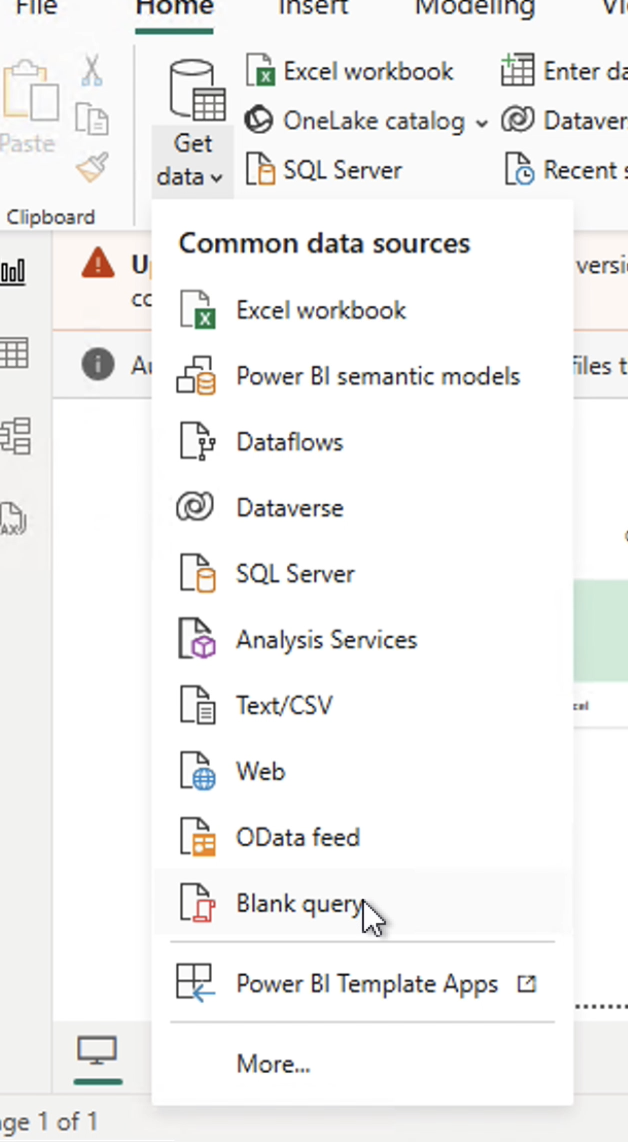
Select Get data and choose Blank query
-
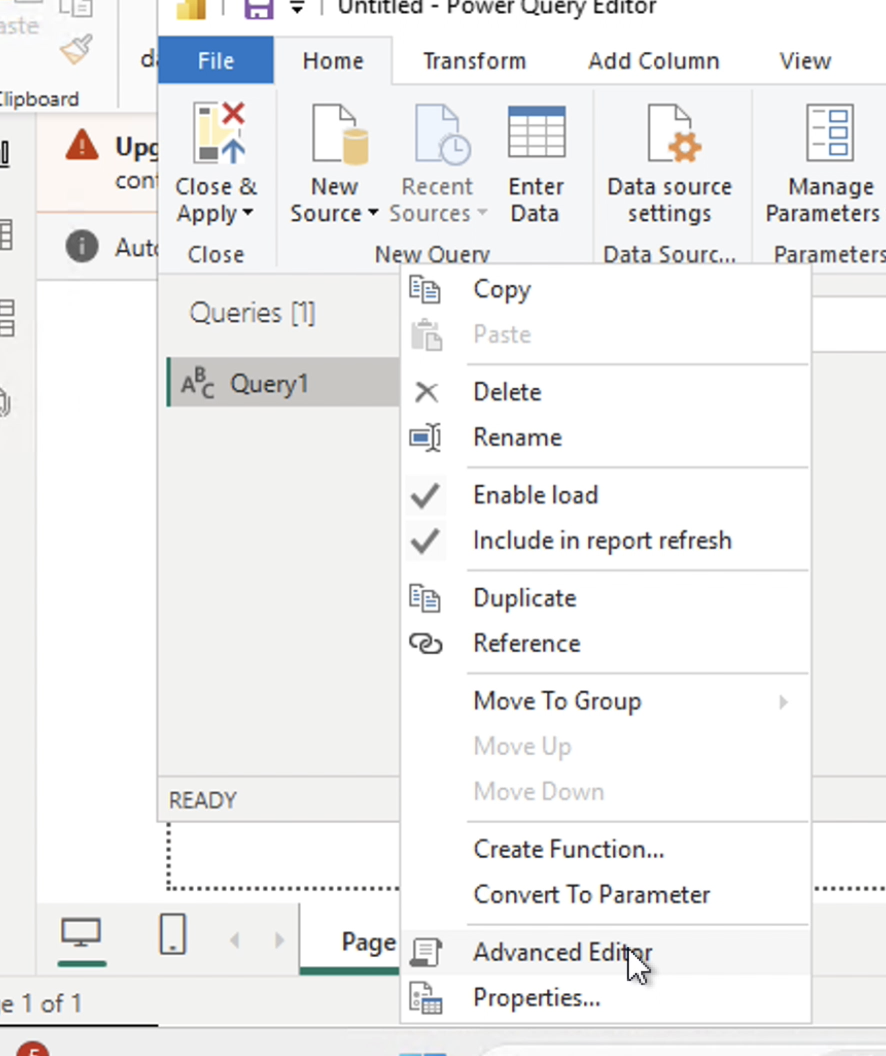
Select the query and choose Advanced Editor
Replace {url} and {api_key} with your values.
Ensure the URL starts with https:// and ends with a /
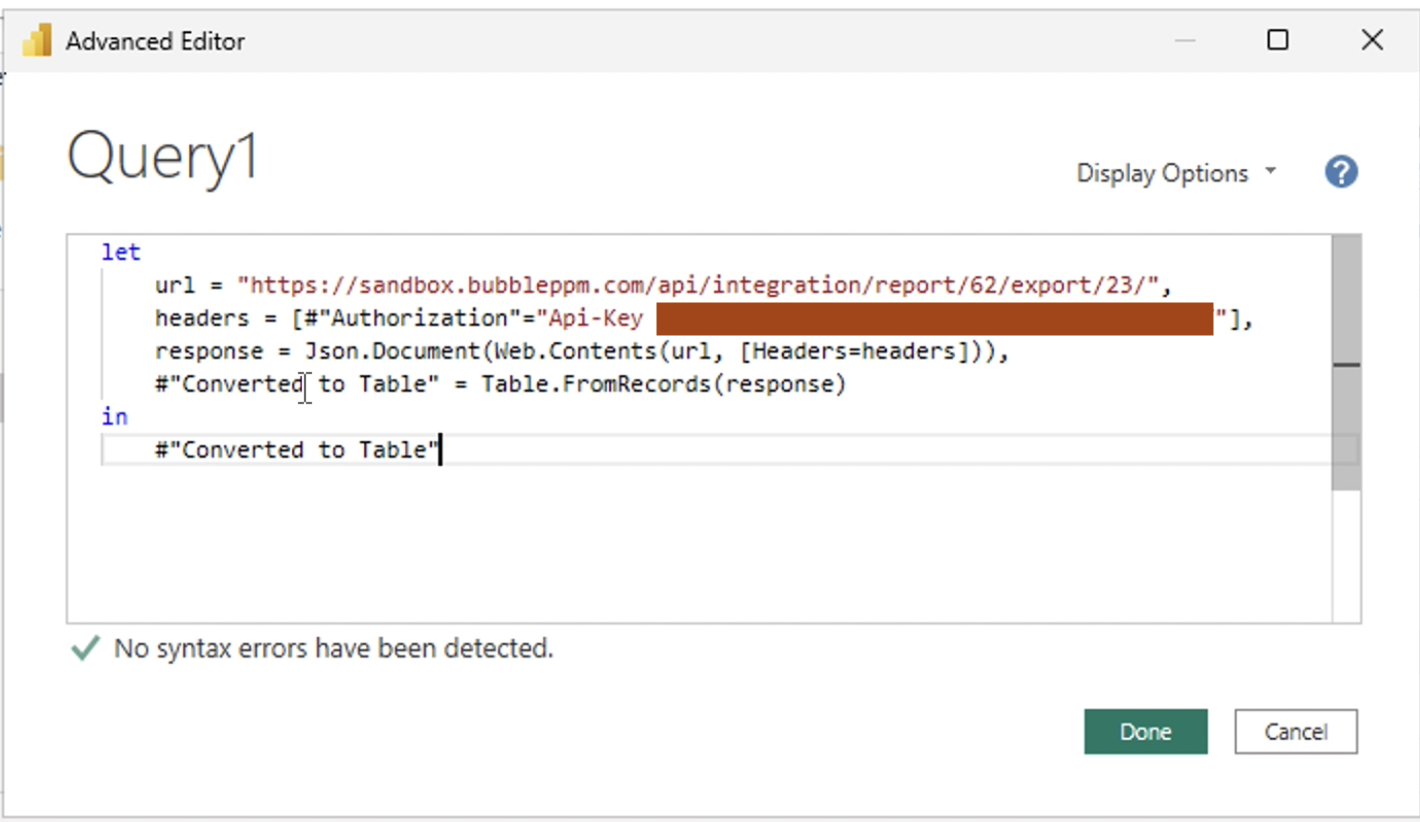
let
    url = "{url}",
    headers = [#"Authorization" = "Api-Key {api_key}"],
    response = Web.Contents(url, [Headers = headers]),
    jsonResponse = Json.Document(response)
in
    jsonResponse
-
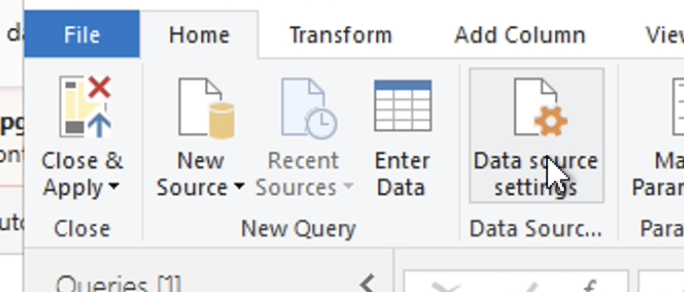
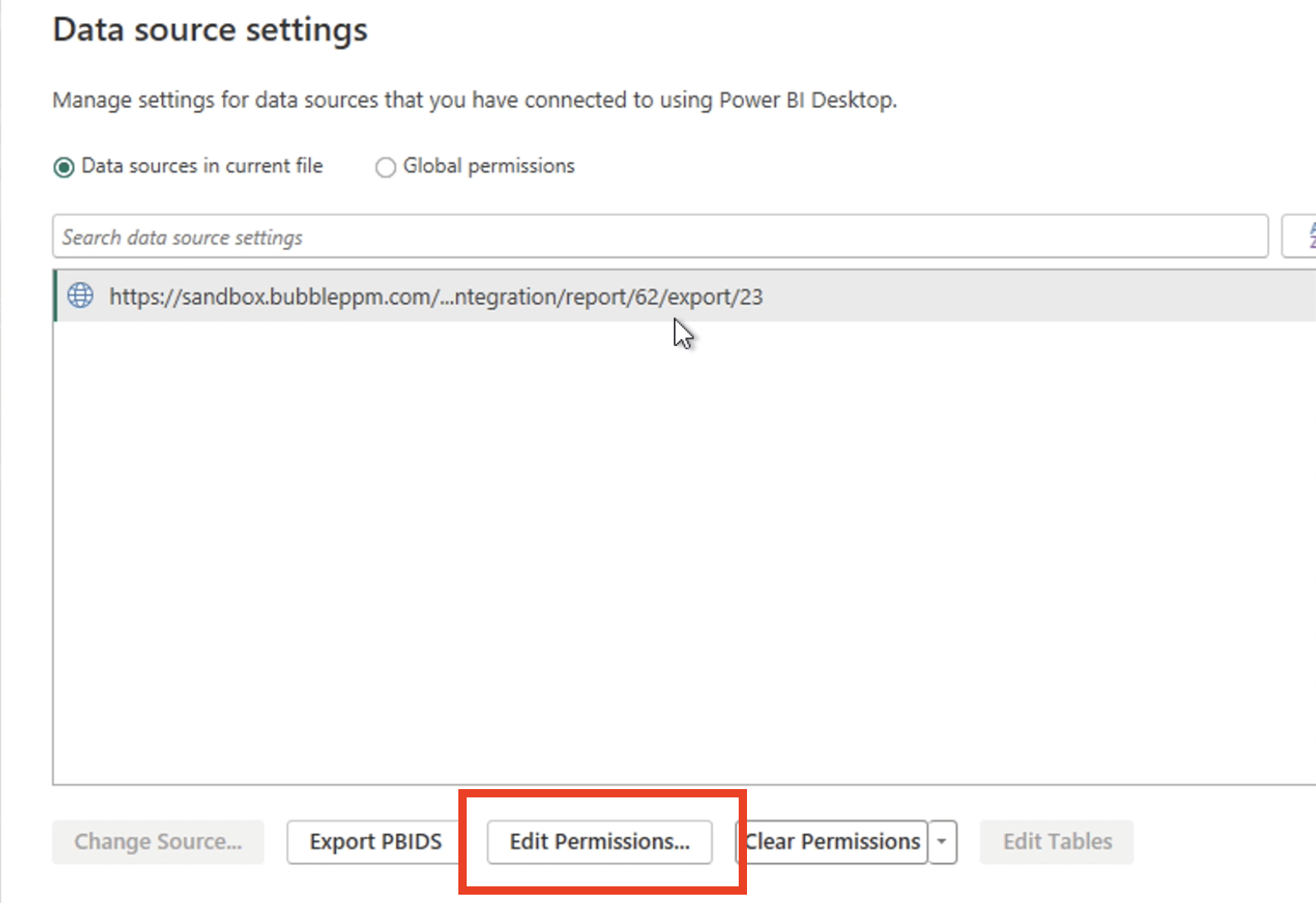
Go to Data source settings
-
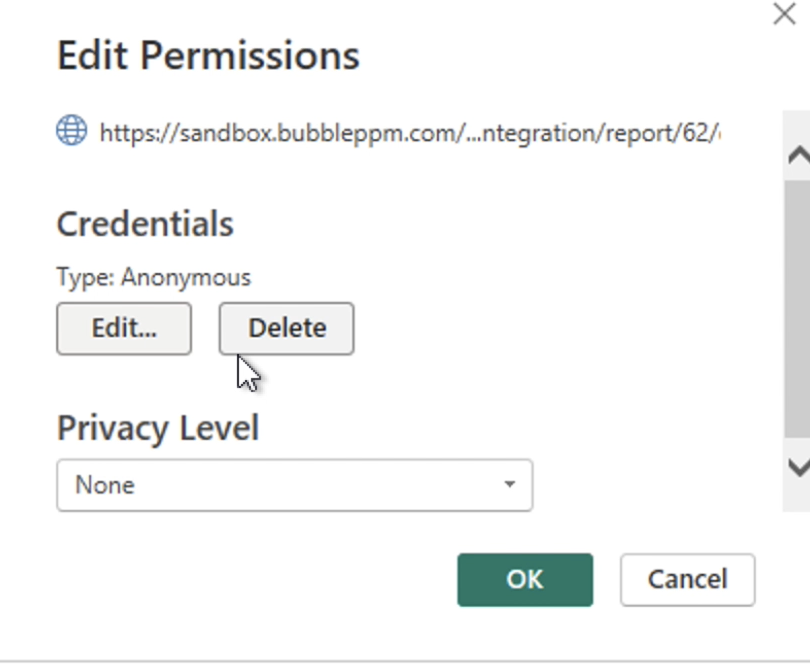
Find the URL you have setup in the query and select Edit Permissions
-
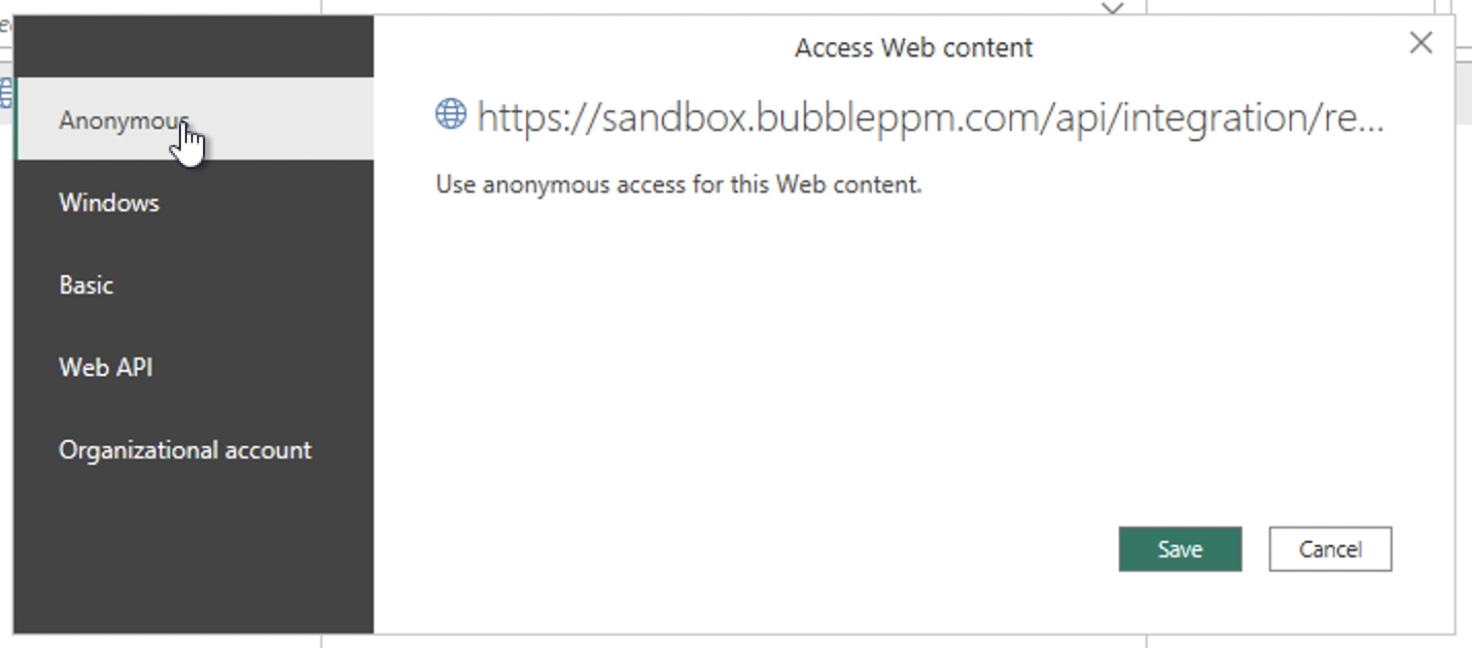
Set Credentials Type to Anonymous and Save
-
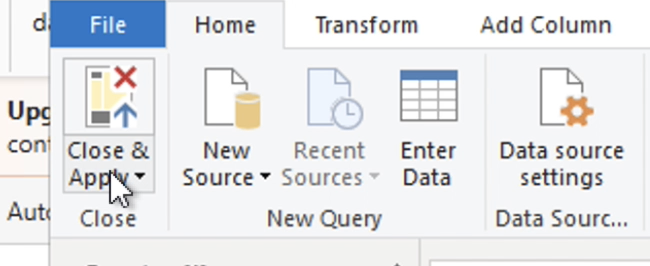
Click Close & Apply to use the new datasource
Power BI Code for Paginated API Call (v3)
Use this code for v3 endpoints with pagination:
let
    url = "https://URL.bubbleppm.com/api/v3/portfolios/56/reports/415/export/",
    api_key = "KEY",
    BaseUrl = url & "?page=",
    Token = api_key,
    // Function to fetch data from API with error handling
    GetJson = (Url as text) =>
        let
            Options = [Headers=[#"Authorization" = "Api-Key " & Token]],
            RawData = try Web.Contents(Url, Options) otherwise null,
            Json = if RawData <> null then try Json.Document(RawData) otherwise null else null
        in
            Json,
    // Function to recursively fetch all pages with proper termination
    GetAllPages = (PageNumber as number) as list =>
        let
            Url = BaseUrl & Text.From(PageNumber),
            Response = GetJson(Url),
            // Check if we got a valid response
            Results = if Response <> null then
                        try Response[results] otherwise {}
                      else {},
            // Check for more pages using the correct API schema
            HasMorePages = if Response <> null then
                            try Response[nextPage] <> null otherwise false
                          else false,
            // Only continue if we have results and potentially more pages
            MoreResults = if List.Count(Results) > 0 and HasMorePages then
                           @GetAllPages(PageNumber + 1)
                         else {}
        in
            if List.Count(Results) > 0 then
                List.Combine({Results, MoreResults})
            else
                {},
    // Fetch all paginated data starting from page 1
    AllEntities = GetAllPages(1),
    // Convert list to table only if we have data
    Table = if List.Count(AllEntities) > 0 then
              Table.FromList(AllEntities, Splitter.SplitByNothing(), null, null, ExtraValues.Error)
            else
              #table({}, {}),
    // Get column names dynamically from first record if data exists
    ColumnNames = if List.Count(AllEntities) > 0 then
                    try Record.FieldNames(AllEntities{0}) otherwise {}
                  else {},
    // Create new column names with "Column1." prefix
    NewColumnNames = List.Transform(ColumnNames, each "Column1." & _),
    // Expand columns dynamically if table has data
    #"Expanded Column1" = if Table.RowCount(Table) > 0 and List.Count(ColumnNames) > 0 then
        Table.ExpandRecordColumn(Table, "Column1", ColumnNames, NewColumnNames)
    else
        Table
in
    #"Expanded Column1"
Troubleshooting & FAQ
-
Q: Why am I not seeing all my data?
A: Make sure you are using the v3 endpoint and handling pagination as shown above. -
Q: My code is failing with authentication errors.
A: Double-check your API key and ensure you are using the correct header format. -
Q: Can I still use the old endpoints?
A: Legacy endpoints are available but may be deprecated. We recommend migrating to v3 as soon as possible.
Migration Guide: Legacy to v3 Endpoints
|
Feature |
v3 Endpoints (Recommended) |
Legacy Endpoints (Not Recommended) |
|---|---|---|
|
Pagination |
✅ Supported |
❌ Not supported |
|
Large dataset support |
✅ Supported |
❌ Limited |
|
Single entity queries |
✅ Supported |
❌ Not supported |
|
Future support |
✅ Supported |
❌ Deprecation planned |
-
Update your API URLs to the v3 format (see above).
-
Update your Power BI queries to handle paginated responses (see code sample below).
-
See the video and troubleshooting tips for details.
Legacy Endpoints (Not Recommended)
GET https://<tenant>.bubbleppm.com/api/integration/report/<report_id>/export/<portfolio_id>/
GET https://<tenant>.bubbleppm.com/api/integration/form/<form_id>/export/<portfolio_id>/
These endpoints do not support pagination and are planned to be deprecated
Example (non-paginated):
[
    {
        "ID #": 1,
        "Project Name": "Project 1",
        "Lifecycle State": "On Hold",
        ...
        "Priority Number": 1
    },
    {
        "ID #": 2,
        "Project Name": "Project 2",
        "Lifecycle State": "Active",
        ...
        "Priority Number": 2
    }
]
Need Help?
If you have questions or need assistance migrating to v3, please contact the support team or refer to the apidocs.